
M3U is a plain-text playlist format: an M3U link is the web address of a file that lists every channel in your IPTV Canada service, with each channel’s name, logo, group and stream address. Paste that link into a player like TiviMate, IPTV Smarters Pro or VLC and it reads the list and shows your channels. The file holds no video itself; it only tells the player where each stream is.
You’ll find your M3U link in the welcome email that comes with an IPTV subscription, usually next to Xtream Codes details that do the same job. This guide explains what’s inside the file, how it differs from M3U8 and Xtream Codes, and exactly where to paste it in each popular app.
1. What M3U Stands For, and What’s Inside the File
M3U is short for “MP3 URL”. It started in the late 1990s as a way to list songs for music players, and because it’s just text, one line per entry, IPTV services adopted it for channel lists. An IPTV playlist uses the extended form, which starts with #EXTM3U and puts a description line before each stream:
#EXTM3U
#EXTINF:-1 tvg-id="news.ca" tvg-name="News Channel" tvg-logo="https://example.com/logos/news.png" group-title="News",News Channel
http://example-server.com:8080/live/username/password/1001.ts- tvg-id matches the channel to its listings in the TV guide.
- tvg-logo is the channel logo the player shows.
- group-title puts the channel in a category, such as News or Sports.
- The last line is the stream address. It usually contains your username and password, which is why an M3U link should be kept private.
2. How a Player Uses Your M3U Link
When you add an M3U link, the IPTV player downloads the file, reads it line by line and builds your channel list from the groups, names and logos. When you pick a channel, it opens that channel’s stream address. Because the player fetches the file again when it refreshes, a link from your provider keeps up with channel changes on its own; a playlist file you downloaded once doesn’t.
The TV guide usually comes separately, as an EPG (XMLTV) link in the same email. The player matches the two through each channel’s tvg-id; our EPG guide explains how. Want to see a real playlist before you pay? An IPTV free trial comes with its own M3U link.
3. M3U vs M3U8
They’re the same format. M3U8 simply means the file is saved as UTF-8 text, so accented and special characters display correctly, which matters for French channel names like “Télé-Québec”. The same .m3u8 extension is also used by HLS, the streaming method many channels use, so you’ll see it in stream addresses too.
| M3U | M3U8 | |
|---|---|---|
| Text encoding | Not fixed (often Latin-1 or ASCII) | UTF-8 |
| Accents and symbols | Can show as garbled characters | Show correctly |
| Logos, groups, guide IDs | Yes (extended M3U) | Yes (extended M3U) |
| Works in IPTV players | Yes | Yes |
In practice you don’t choose: you paste the link your provider gives you, and every app below reads both.
4. M3U or Xtream Codes: Which to Use
Most providers give you both. Xtream Codes is the same account split into three fields (server URL, username, password), and the app uses them to fetch live TV, movies, series, catch-up and the guide as separate lists. An M3U link packs everything into one address.
| M3U link | Xtream Codes | |
|---|---|---|
| What you enter | One long link | Server URL, username, password |
| TV guide | Usually a separate EPG link | Included |
| Movies and series | Mixed into the channel list in many apps | Own sections, with posters |
| Works in | Almost every player, including VLC and Kodi | TiviMate, Smarters, XCIPTV, GSE and most dedicated IPTV apps |
Use Xtream Codes when your app offers it, and M3U when it doesn’t (VLC, Kodi, Smart IPTV and the Roku apps only take M3U). Our guide on where to get your IPTV URL shows how to read each part of your email.
5. Where to Paste an M3U Link in Each App
Paste the link exactly as it is in your email: the whole thing, no spaces, from http to the last character.
TiviMate (Fire TV, Android TV)
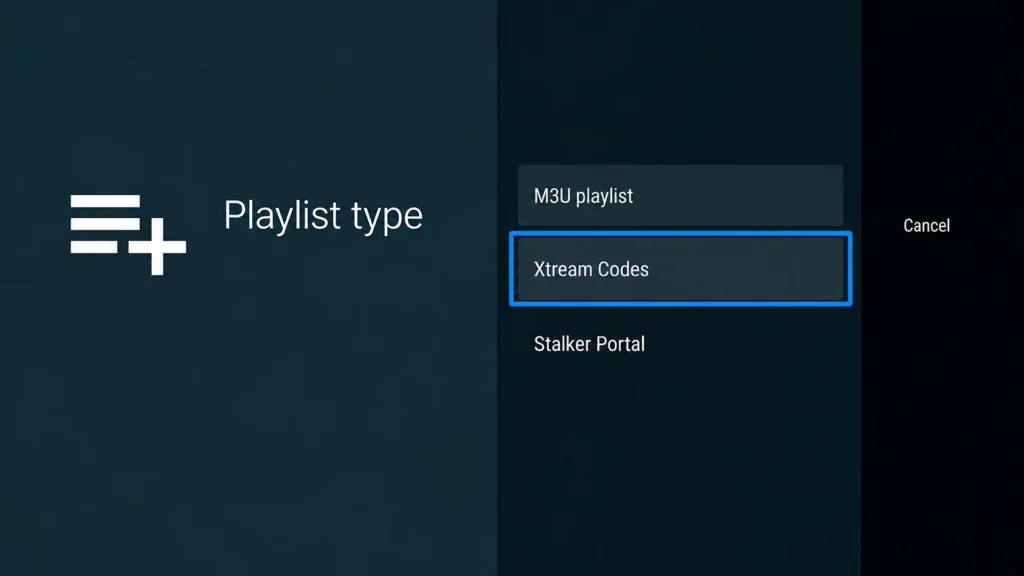
Select Add playlist, then M3U playlist, and paste the link. TiviMate then offers to add a TV guide, which is where the EPG link goes. Our TiviMate guide has every step.
IPTV Smarters Pro (TVs, phones, Android TV)
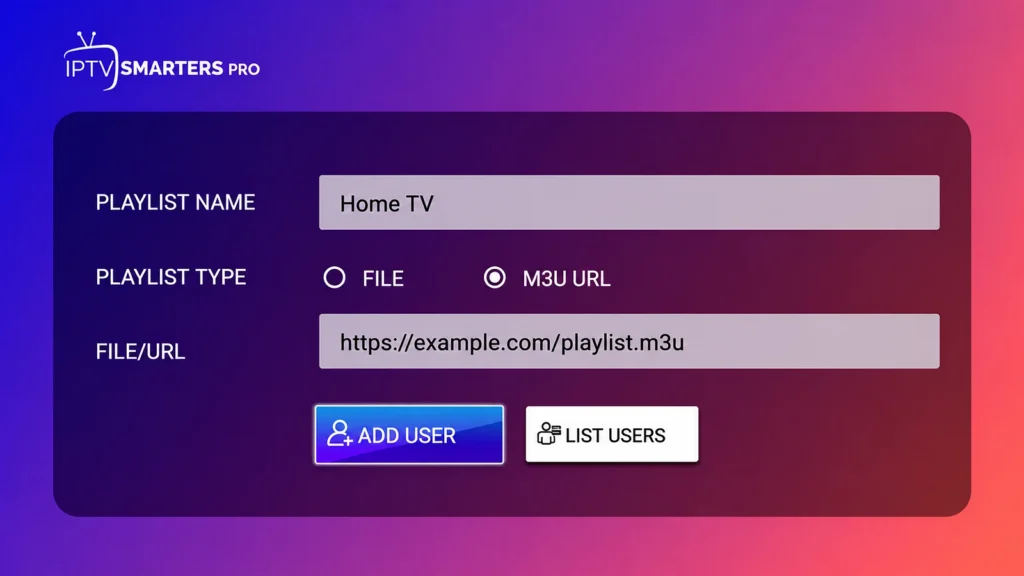
Choose M3U URL (Load Your Playlist or File/URL on Android TV), give the playlist a name, paste the full link and select Add User. Our IPTV Smarters Pro guide covers each device.
GSE Smart IPTV (iPhone, iPad, Apple TV)
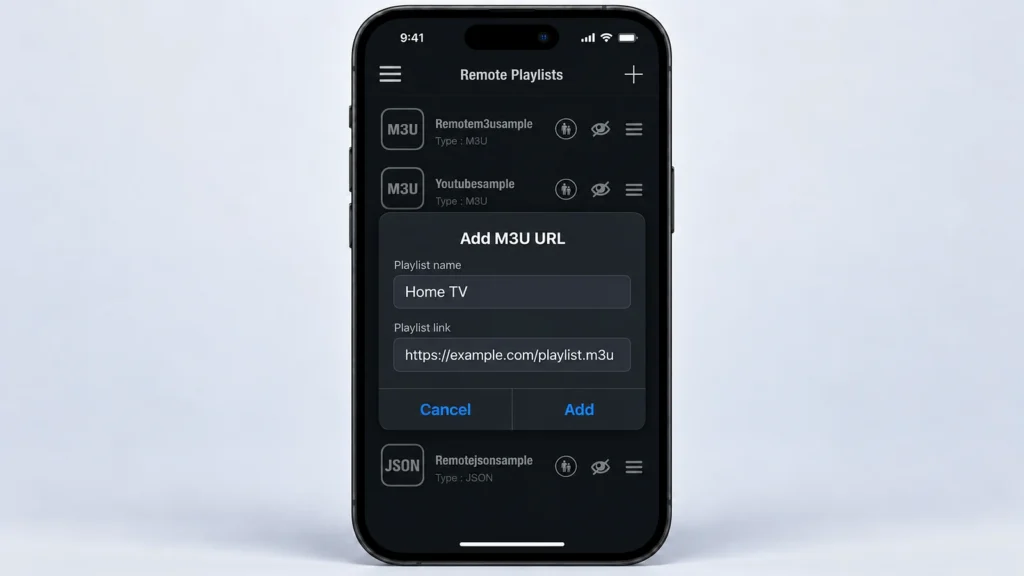
Open Remote Playlists, tap +, then Add M3U URL. Enter a name, paste the link and tap Add. See our GSE Smart IPTV guide.
Kodi (Windows, Fire TV, Android)
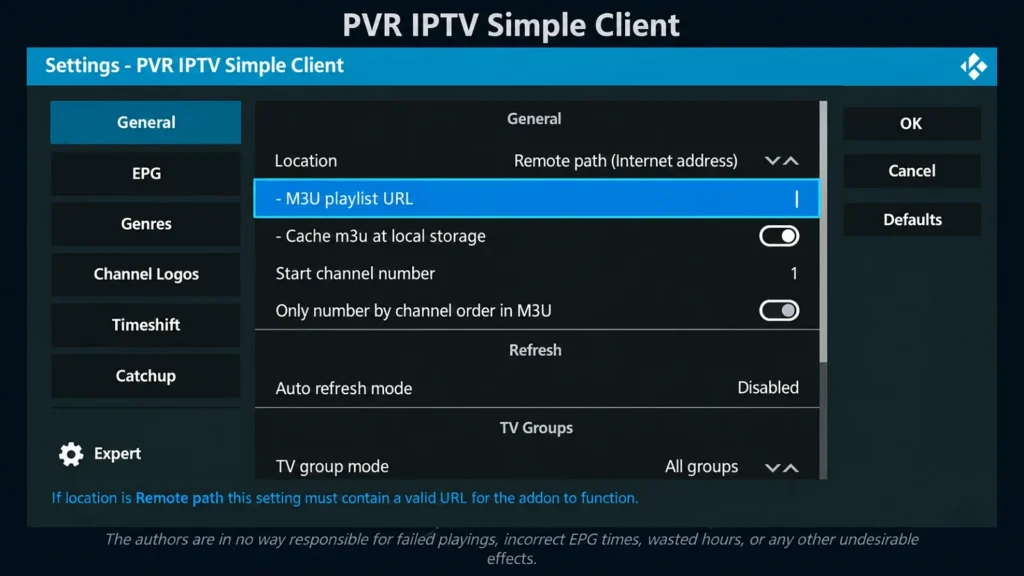
In the PVR IPTV Simple Client add-on, select Configure, set Location to Remote path (Internet address) and paste the link in M3U playlist URL. Our Kodi guide walks through the add-on.
VLC (Windows, Mac)
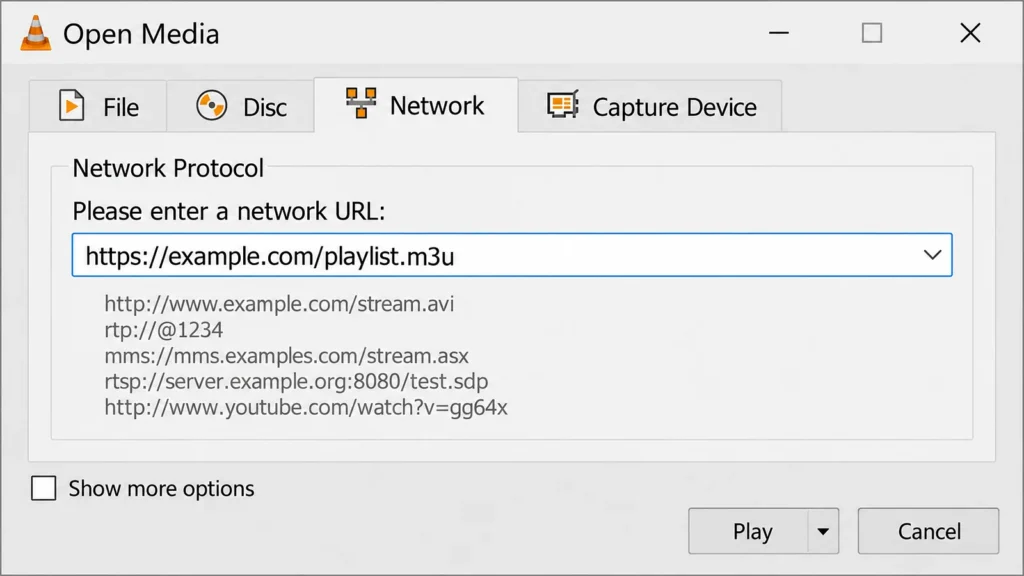
Open Media, then Open Network Stream, paste the link and select Play. To switch channels, open View, then Playlist, and double-click one. VLC has no TV guide, so it’s best for a quick test.
MyIPTV Player (Windows, Xbox)
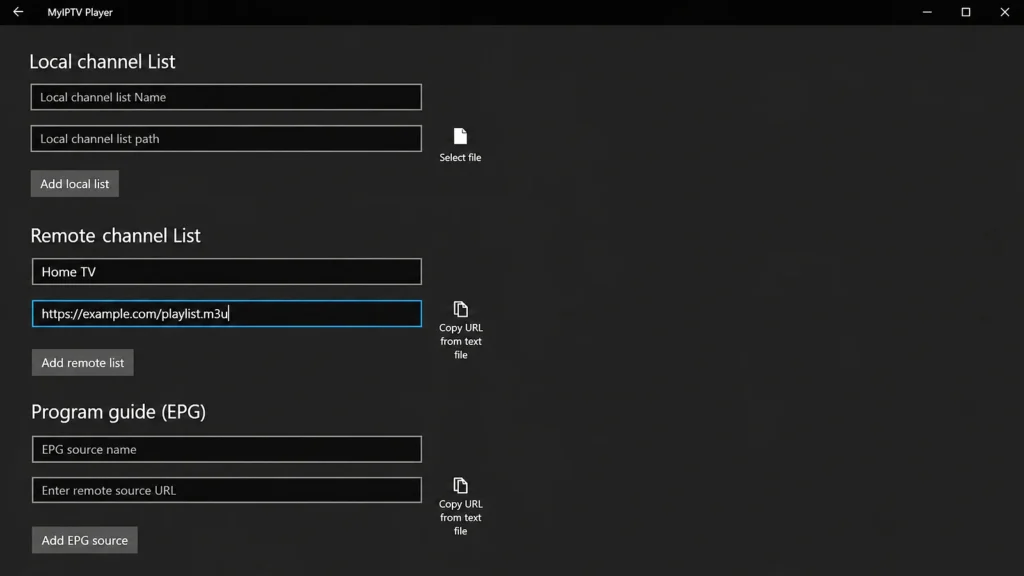
In Settings, open Add new playlist and EPG source; under Remote channel list, type a name, paste the link and select Add remote list. Our Windows PC guide covers the rest.
Smart IPTV (Samsung, LG)
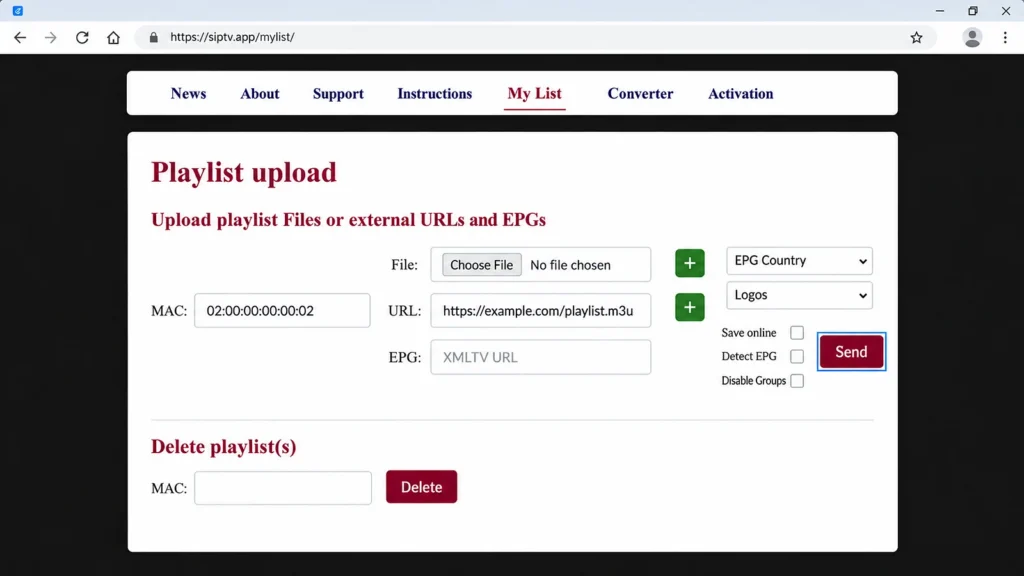
Smart IPTV takes the link on its website rather than on the TV: open siptv.app/mylist on a phone or computer, enter the MAC address the app shows and your full M3U link, complete any check the form asks for, then select Send. Our Samsung and LG guides show both TVs.
6. Testing a Link and Fixing Problems
The quickest test is VLC on a computer: if the link opens a channel list there, it works, and any problem is in the app on your TV. Pasting it into a web browser usually just downloads the file, which tells you the address is right but not much more.
| Problem | Likely cause | Fix |
|---|---|---|
| “Invalid playlist” or nothing loads | Part of the link missing, or a space at the end | Copy the whole link again from the email; paste rather than type |
| Worked before, now empty | Expired plan, or the provider changed the link | Check your renewal date; ask the provider for the current link |
| Channel names show odd symbols | File read with the wrong encoding | Use the M3U8 or UTF-8 version of the link if your provider offers one |
| Channels load but no guide | EPG link not added | Add the XMLTV link in the app’s EPG settings |
| Channels buffer | The connection or the server, not the format | See our buffering and outage guide |
7. Is Using an M3U Link Legal?
The format is ordinary and legal; it’s the same kind of file music players have used for decades. What matters is what the playlist points to. A link from a licensed provider is fine; free M3U lists shared on forums and social media almost always point to streams nobody has the rights to, and they stop working without warning. Our guide on whether IPTV is legal in Canada explains what to check.
Frequently Asked Questions
Is M3U the same as IPTV?
No. IPTV is TV delivered over the internet; M3U is one way of handing your player the list of channels.
What is the difference between M3U and M3U8?
Only the text encoding: M3U8 is saved as UTF-8, so accents and symbols display correctly. Both carry the same channel information.
Should I use M3U or Xtream Codes?
Xtream Codes when your app supports it, since the guide and on-demand sections come with it. Use M3U for VLC, Kodi, Smart IPTV and other apps that only take a link.
Why is my M3U playlist not loading?
Usually a link that was cut off when copied, a space at the end, or an expired plan. Paste it into VLC on a computer to test it.
Can I make my own M3U file?
Yes, in any text editor, but it only works if the stream addresses inside it are valid, and those come from your provider.
Is it safe to share my M3U link?
No. The link contains your username and password, so anyone with it can use your connections. Keep it private like a password.
Does M3U work on smart TVs?
Yes, through an app such as IPTV Smarters Pro or Smart IPTV. The TV’s own media player usually can’t open an IPTV playlist by itself.
Conclusion
An M3U link is nothing more mysterious than a long address that hands your player a list of channels. Whether it ends in .m3u or .m3u8 makes no practical difference, and when your app also offers an Xtream Codes login, that’s usually the better way in because the guide and movies come with it.
Treat the link like a password, since your login is built into it, and keep it somewhere you can copy it from. Nine times out of ten, a playlist that “won’t load” is a link that lost a few characters on the way from the email to the TV.